
Responsibilities
Plugin spawning — On startup, the Channel Manager reads all enabledChannelConfig entries from <workspace>/channels/ and spawns one subprocess per channel. Each subprocess receives the local WebSocket address via --hiro-ws and a log directory via --log-dir.
Connection handling — Plugins connect back over WebSocket using JSON-RPC 2.0. The Channel Manager accepts these connections and dispatches each incoming message by its method field.
Inbound routing — channel.receive notifications from plugins are forwarded to the on_message callback, which is the Communication Manager’s receive() method.
Event routing — channel.event notifications (such as gateway_connected or pairing_request) are forwarded to the on_event callback, which is handled directly in the server process for pairing logic.
Outbound dispatch — The Communication Manager calls send_to_channel() or broadcast() to push messages back to one or all connected plugins.
Graceful shutdown — On stop, the Channel Manager sends a channel.stop notification to each connected plugin, waits one second, then terminates any subprocesses that are still running.
Plugin lifecycle
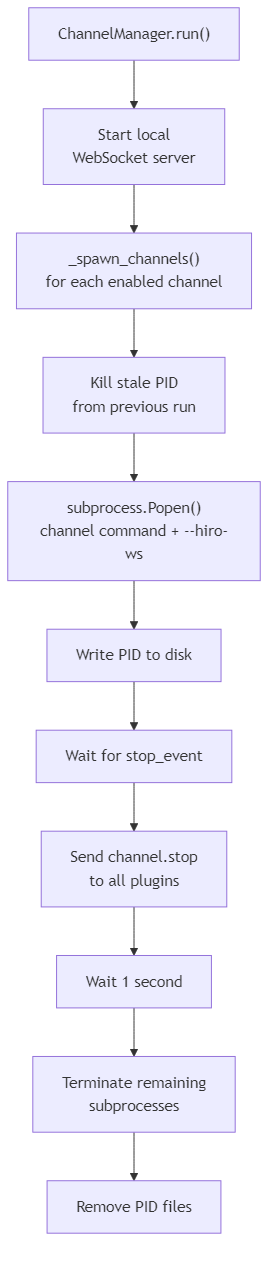
Connection protocol
Channel plugins communicate with the Channel Manager over a local WebSocket atws://127.0.0.1:<plugin_port> using JSON-RPC 2.0.
Notifications (no id) are used for fire-and-forget messages in both directions. Requests (with id) are used when the sender needs a response — currently only channel.status.
Plugin → Channel Manager
| Method | Direction | Description |
|---|---|---|
channel.register | Notification | Plugin announces itself with name, version, and description. Triggers config push. |
channel.receive | Notification | Plugin delivers an inbound UnifiedMessage to the server. |
channel.event | Notification | Plugin reports an event such as gateway_connected or pairing_request. |
Channel Manager → plugin
| Method | Direction | Description |
|---|---|---|
channel.send | Notification | Deliver an outbound UnifiedMessage to the plugin. |
channel.configure | Notification | Push updated configuration to the plugin. |
channel.stop | Notification | Signal the plugin to shut down. |
channel.event | Notification | Forward a server-side event to the plugin. |
channel.status | Request | Ask the plugin for its current status. Awaited with a 5-second timeout. |
Registration and config push
When a plugin sendschannel.register, the Channel Manager stores the connection and immediately sends a channel.configure notification with the plugin’s stored configuration. If a plugin with the same name was already connected, the old connection receives channel.stop and is closed with WebSocket close code 4010 before the new one is accepted.
Subprocess isolation
Each channel plugin runs as a fully isolated subprocess:- Windows:
CREATE_NEW_PROCESS_GROUP | CREATE_NO_WINDOWflags - Unix/macOS:
start_new_session=True stdoutandstderrare discarded — plugins write to their own log files in--log-dir
<workspace>/channels/<name>.pid immediately after spawning. On the next startup, any stale PID file from a previous run is used to kill the old process before a new one is spawned.
Channel configuration
Each channel’s configuration is stored as<workspace>/channels/<name>.json and loaded into a ChannelConfig dataclass.
| Field | Description |
|---|---|
name | Channel identifier, e.g. device, telegram |
enabled | Whether the channel is spawned on startup |
command | Subprocess command. Defaults to ["hiro-channel-<name>"] |
config | Arbitrary key-value pairs pushed to the plugin on registration |
workspace_dir | Optional path for uv run dev mode |
Integration
The Channel Manager is wired to the rest of the server inserver_process.py:
get_channel_info() to expose connected channel metadata on the status endpoint.