
Storage layout
config.json and master_key.pem are intentionally kept as files. config.json is read at boot before the database can open, and master_key.pem is a crypto artifact — neither benefits from a relational store.
The global workspace registry (registry.json, one level above all workspaces) also stays as a file for the same reason: it is read before any workspace is selected.
SQLite — workspace.db
workspace.db holds all structured entities: things with a defined schema, a bounded row count, and access patterns based on identity (get by id) or membership (list all, filter by field).
Tables
agents
Replaces <workspace>/agent/config.json. Supports multiple named agent definitions per workspace.
| Column | Type | Notes |
|---|---|---|
id | TEXT PK | UUID |
name | TEXT | Human-readable label, unique within workspace |
is_default | BOOLEAN | Only one agent may be default at a time |
provider | TEXT | LangChain provider identifier (e.g. openai) |
model | TEXT | Model name (e.g. gpt-4.1-mini) |
temperature | REAL | Sampling temperature |
max_tokens | INTEGER | Max reply tokens |
system_prompt | TEXT | Full system prompt text (was agent/system_prompt.md) |
created_at | TEXT | ISO 8601 |
conversation_channels
Holds the metadata for each conversation thread — the “shape” of a conversation, not its messages.
| Column | Type | Notes |
|---|---|---|
id | TEXT PK | UUID — also used as the JSONL filename and LangGraph thread_id |
name | TEXT | Display name (e.g. “Home”, “Personal”) |
type | TEXT | direct or group |
agent_id | TEXT FK → agents | Which agent handles this channel |
created_at | TEXT | ISO 8601 |
last_message_at | TEXT | ISO 8601, updated on each new message, used for sort order |
devices
Replaces <workspace>/devices.json.
| Column | Type | Notes |
|---|---|---|
device_id | TEXT PK | |
device_public_key | TEXT | Base64 encoded |
paired_at | TEXT | ISO 8601 |
expires_at | TEXT | ISO 8601, nullable |
metadata | TEXT | JSON blob for arbitrary device metadata |
channel_plugins
Replaces the per-file <workspace>/channels/<name>.json pattern. One row per installed channel plugin.
| Column | Type | Notes |
|---|---|---|
name | TEXT PK | Plugin identifier (e.g. telegram, devices) |
enabled | BOOLEAN | |
command | TEXT | JSON array — subprocess command |
config | TEXT | JSON blob — plugin-specific settings |
Conversation messages — conversations/<thread_id>.jsonl
Message logs are not stored in SQLite. Messages are append-only, unbounded in volume, and their primary access patterns (full-text search, semantic retrieval, RAG) do not benefit from a relational model.
Each conversation thread has a single JSONL file. thread_id is the same UUID used as the conversation_channels.id primary key, so the filename is always <workspace>/conversations/<channel_id>.jsonl.
Each line is a self-contained JSON record:
| Field | Description |
|---|---|
id | UUID per message |
sender_id | Prefixed identifier: device:<id>, agent:<name>, channel:<name> |
role | user or assistant |
content_type | text, image, voice, tool_result |
body | Serialized content payload |
ts | ISO 8601 timestamp |
Conversation memory (LangGraph)
The Agent Manager currently usesInMemorySaver as its LangGraph checkpointer. This is replaced with SqliteSaver pointing at workspace.db, using the same thread_id (channel_id UUID) as the checkpoint key.
This gives the agent persistent memory across server restarts without any change to the Agent Manager’s message-processing logic.
workspace.db — they coexist with the application tables without conflict.
How components interact with the store
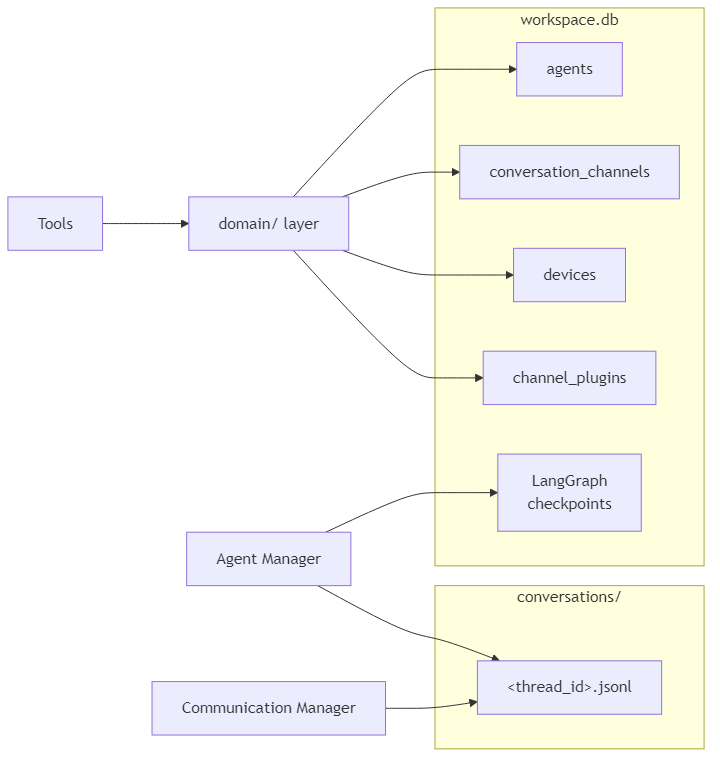
domain/ layer is the only code that reads from or writes to the SQLite application tables. Tools, HTTP handlers, and CLI commands all go through domain functions — they are not aware of the database directly. The Agent Manager and Communication Manager write message logs directly to JSONL files.
Schema evolution policy
These rules keep schema changes cheap and existing user databases safe without a migration runner.Additive-only columns
Never drop or rename a column once it exists in a deployed database. Add new columns; abandon old ones in place. An unused column costs nothing and keeps old databases readable without any upgrade step — exactly like Pydantic ignoring extra JSON keys. When a column must logically go away, stop reading it in Python and leave the SQL column untouched. Drop it only as a deliberate clean-up step on a known minimum SQLite version.Introspection-based upgrade in ensure_db
ensure_db and init_db run two passes on every startup:
CREATE TABLE IF NOT EXISTS— creates all tables on a fresh database.PRAGMA table_info(<table>)+ALTER TABLE ADD COLUMN— adds any columns that are present in_EXPECTED_COLUMNSbut absent from the actual table.
_EXPECTED_COLUMNS is the authoritative list of every non-primary-key column in the schema. Adding a column means appending one entry to that list; the upgrade runs automatically on next startup for every existing database. No version counter, no migration state to track.
JSON columns for flexible sub-fields
Columns whose internal structure is likely to change (config, metadata, command) are stored as JSON TEXT blobs. Adding a sub-field costs nothing — it is a Python dict change only, with no ALTER TABLE required. The JSON columns are always read whole and parsed in Python; no SQLite JSON functions are used, so there is no minimum SQLite version constraint for this pattern.
Nullable or defaulted columns everywhere else
Every new column must either be nullable or carry aDEFAULT value. This is a hard requirement for ALTER TABLE ADD COLUMN to succeed on existing rows. Enforce NOT NULL without a default only on primary keys and columns that are set at insert time by application code.
Destructive changes (rename, type change, drop)
_EXPECTED_COLUMNS only handles additive changes. Renames, type changes, and column drops require either a versioned one-off SQL entry (gated by PRAGMA user_version) or a full table rebuild. A lightweight migration runner for these cases will be added once development stabilises and the schema reaches a stable baseline. Until then, a reset_db() helper that deletes and recreates workspace.db is sufficient — users re-run hirocli channel setup and hirocli device add to repopulate.
SQLite version floor
This project targets Windows only with Python ≥ 3.11. Python on Windows bundles its own SQLite (not the system library), so the version is deterministic:| Python | Bundled SQLite | Key capabilities unlocked |
|---|---|---|
| 3.11 | 3.39.x | DROP COLUMN (3.35+), RENAME COLUMN (3.25+) |
| 3.12 | 3.43.x | JSON operators -> / ->> (3.38+) |
Flutter app relationship
The Flutter app maintains its own local Drift/SQLite database. This is not a sync — the two databases are structurally different and serve different purposes.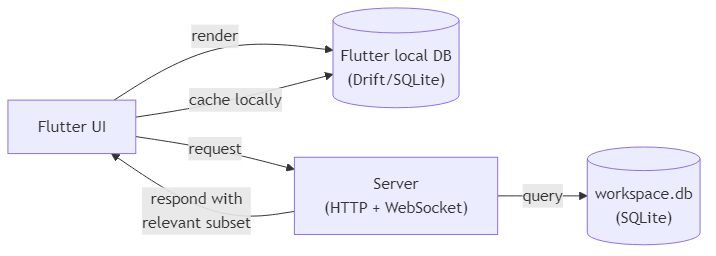
Implementation steps
1. Add dependencies
Add tohiroserver/hirocli/pyproject.toml:
aiosqlite provides async SQLite access. SQLModel combines Pydantic (already used in domain/) with SQLAlchemy table definitions, so existing domain models can evolve into table-backed models with minimal friction.
2. Create the database module
Createhiroserver/hirocli/src/hirocli/domain/db.py:
async def init_db(workspace_path: Path) -> aiosqlite.Connection— opensworkspace.db, runsCREATE TABLE IF NOT EXISTSfor all four tables, returns the connectionasync def get_db(workspace_path: Path)— async context manager wrappinginit_db
3. Migrate domain entities
Replace each JSON file’sload_* / save_* helpers in domain/ with async functions that read from and write to workspace.db:
| Current file | Replaces | Domain module |
|---|---|---|
agent/config.json + agent/system_prompt.md | agents table | domain/agent_config.py |
devices.json | devices table | domain/pairing.py |
channels/<name>.json files | channel_plugins table | domain/channel_config.py |
domain/conversation_channel.py (new) for CRUD on conversation_channels.
No changes are needed above the domain/ layer — tools, commands, and runtime services call the same function signatures.
4. Create the conversation log writer
Createhiroserver/hirocli/src/hirocli/domain/conversation_log.py:
async def append_message(workspace_path: Path, channel_id: str, message: dict)— opensconversations/<channel_id>.jsonlin append mode, writes one JSON lineasync def read_messages(workspace_path: Path, channel_id: str, limit: int = 100) -> list[dict]— reads the lastlimitlines from the file
conversations/ directory is created during workspace initialisation.
5. Swap LangGraph checkpointer
Inruntime/agent_manager.py, replace InMemorySaver with AsyncSqliteSaver:
thread_id passed to agent.ainvoke() should be the conversation_channels.id UUID, replacing the current channel:sender_id string. This ties checkpointed memory to a persistent conversation channel record.
6. Wire database initialisation into server startup
Inruntime/server_process.py, call init_db(workspace_path) once during startup before any services start. Pass the open connection (or a factory) to AgentManager, ChannelManager, and any domain functions that need it.